


Stationary planets
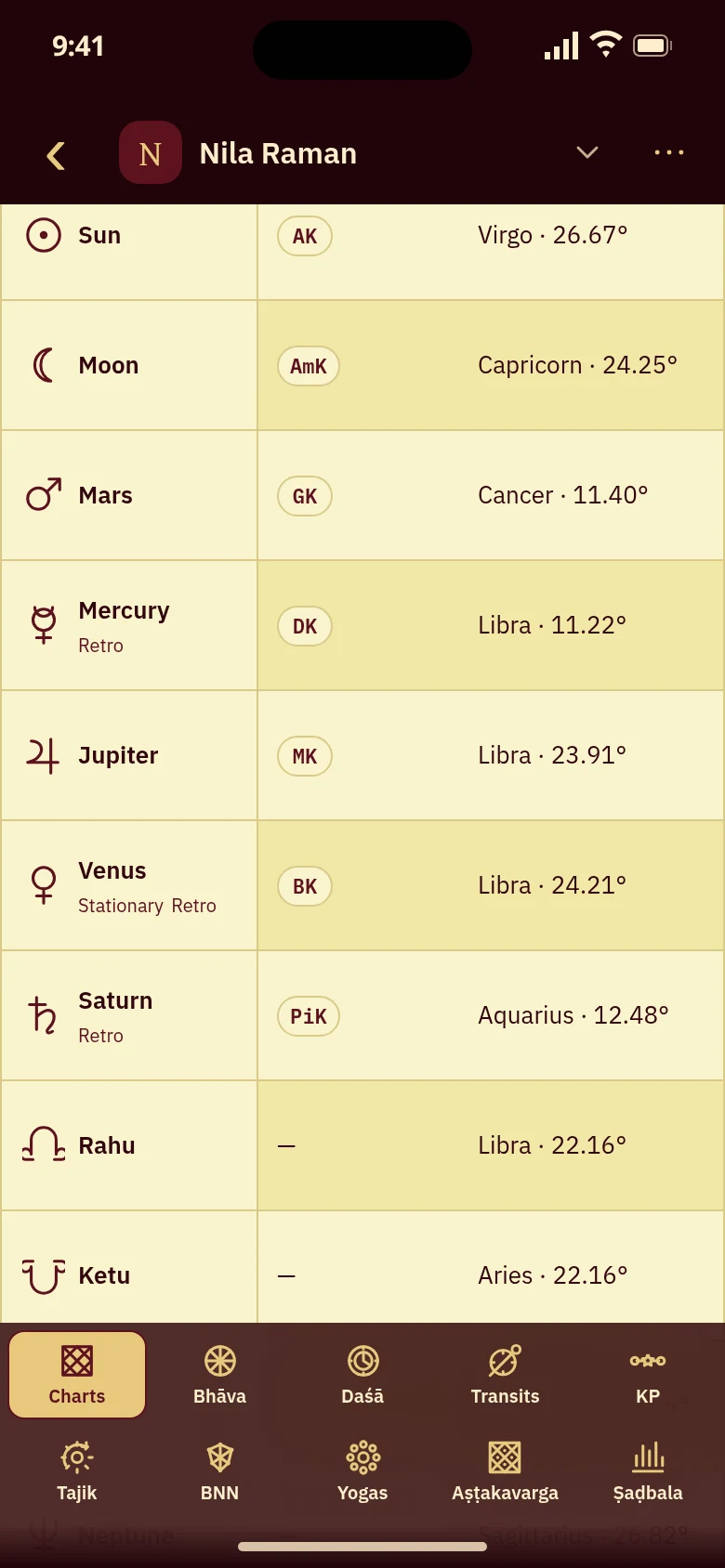
A stationary marker describes very slow apparent motion near a direct–retrograde turn. Mạghā's natal ledger shows that condition; Planet station search locates the turn's time. The badge does not mean the planet has stopped in space.
The prepared Venus speed is minus 0.03196 degrees per day, within the Venus near-station threshold of 0.05 degrees per day. Its natal ledger therefore shows Stationary and Retro. The diagram is a speed comparison, not a calculated station occurrence.
A slow speed can qualify without being exactly zero
Mạghā compares a planet's calculated speed with a threshold chosen for that planet. A speed close enough to zero qualifies for Stationary. Retro or Direct gives the direction at the chart's moment. The label therefore covers a near-station span, rather than identifying only the instant when the direction changes.
Nila's natal Venus has a speed of minus 0.03196 degrees per day. Its magnitude is below the Venus threshold of 0.05 degrees per day, so the ledger shows Stationary and Retro together. The diagram places that prepared speed on a scale around zero without inventing a sequence of daily positions.
This is Mạghā's modern near-station convention. It does not define a single speed threshold for every planet. A precise station time stored with a chart is separate metadata; the badge itself remains a description of motion at the chart's recorded moment.

Choose the planet and the direction of its turn
Planet station in Android's Advanced transit builder searches Mercury, Venus, Mars, Jupiter, Saturn, Uranus, Neptune or Pluto, excluding Sun, Moon and nodes. Choose Direct, Retrograde or Either direction, then Next, Previous or Date range. These criteria describe the turn being sought, without changing natal motion labels. Check returned coverage: a bounded search may need continuation and does not guarantee a station within the chosen period.
Read the natal badge and search the turn separately
Nila's natal Planets ledger shows Venus as Stationary and Retro; this is birth-chart data, not a transit badge. To locate a dated turn, use Find a transit time, review occurrences and choose Open in Transits to apply one. Selecting a row alone leaves the sky unchanged.
The preview demonstrates real station-search criteria but cannot compute an occurrence. Its natal Venus marker is prepared output. Station search is free in the full app.
Questions about stations and motion markers
Does Stationary mean a planet has zero speed?
The marker means its calculated speed meets Mạghā's near-station convention for that planet. It need not be exactly zero. Retro or Direct gives the direction at the recorded chart moment. Use Planet station when you want the time of the turn itself.
Is a stationary planet always retrograde?
No. The ledger can pair Stationary with Retro or Direct. Slow motion near either side of a turn can meet the speed threshold. In Nila’s chart, natal Venus shows Stationary and Retro; that one chart does not describe every station.
Can I search for the end of Mercury retrograde?
In Android's Advanced transit builder, choose Planet station, Mercury and Direct, then set the search period. That asks for the turn toward direct motion. Read any occurrence and the searched coverage before applying its time with Open in Transits. The bundled preview shows choices only.
How can I identify a stationary planet in my chart?
The badge described here belongs to the natal Planets ledger. The transit chart does not draw that station marker. Use the station search for a turn's time, then open the selected occurrence in Transits to inspect the planetary positions at that instant.
Choose the station you want to find

Open the real Transits view for Nila Raman’s chart, with its retrograde markers. The preview stops at Find a transit time, where Planet station searches begin.
Open station search