


Śūla Daśā has its own sign-period sequence
Śūla Daśā is a sign-based timing system listed as Shoola in Mạghā. It is separate from Nirayana Shoola. Inspect each period's start, end and nested intervals; the chart's dates do not certify events or lifespan.
Nila’s chart at 12 September 2026. Leo 1 years, 1994-10-14 to 1995-10-14; Cancer 6 years, 1995-10-14 to 2001-10-13; Gemini 4 years, 2001-10-13 to 2005-10-13; Taurus 5 years, 2005-10-13 to 2010-10-14; Aries 3 years, 2010-10-14 to 2013-10-13; Pisces 7 years, 2013-10-13 to 2020-10-13; Aquarius 8 years, 2020-10-13 to 2028-10-13; Capricorn 1 years, 2028-10-13 to 2029-10-14; Sagittarius 10 years, 2029-10-14 to 2039-10-14; Scorpio 8 years, 2039-10-14 to 2047-10-14; Libra 12 years, 2047-10-14 to 2059-10-14; Virgo 1 years, 2059-10-14 to 2060-10-13. Dates and lengths are unchanged saved output.
Birth marker · 14 Oct 1994
- 01Leo14 Oct 1994 →
14 Oct 1995 - 02Cancer14 Oct 1995 →
13 Oct 2001 - 03Gemini13 Oct 2001 →
13 Oct 2005 - 04Taurus13 Oct 2005 →
14 Oct 2010 - 05Aries14 Oct 2010 →
13 Oct 2013 - 06Pisces13 Oct 2013 →
13 Oct 2020 - 07Aquarius13 Oct 2020 →
13 Oct 2028 - 08Capricorn13 Oct 2028 →
14 Oct 2029 - 09Sagittarius14 Oct 2029 →
14 Oct 2039 - 10Scorpio14 Oct 2039 →
14 Oct 2047 - 11Libra14 Oct 2047 →
14 Oct 2059 - 12Virgo14 Oct 2059 →
13 Oct 2060
UTC dates. Widths follow the saved duration in days. Dates are shown in UTC. Gold marks the current period.
See the saved signs and their different lengths
The saved Shoola example begins Leo, Cancer, Gemini and Taurus, with respective main-period lengths of one, six, four and five years. Aries, Pisces and Aquarius follow. The strip uses those saved lengths rather than equal segments, and it retains the exact sign order from the fixture.
Aquarius is the main interval at the reference moment, 12 September 2026, with saved dates from October 2020 to October 2028. These dates belong to the chart. A different birth chart may have different boundaries; the preview does not accept your birth details or update its clock to the present day.

Compare Shoola with the method you intend to study
When a traditional name appears in several sources, keep the calculation conventions and reference chart beside it. This guide does not choose a universal rule from among those accounts. It provides the saved app sequence and the ordinary steps needed to inspect the selected system.
The shorter periods can help you see how the main interval is subdivided, but neither a color nor a date boundary is an outcome by itself. Compare Shoola and Nirayana Shoola only after checking their headers and actual dates. Their separate picker entries are a useful reminder to keep a reading attached to its chosen framework.

Open Śūla Daśā on a saved chart
Open a saved chart, then the Daśā system menu. Choose Rāśi and Other Daśās and select Shoola. The selected system name appears above the period list. Expand the relevant interval to inspect its shorter periods while keeping the parent’s start and end dates in view.
The walkthrough below uses the real bundled app, with its original labels and dates. It stops on this system’s prepared main period for Nila Raman’s chart on 12 September 2026. To explore your own chart, follow the ordinary app link; this preview shows the saved chart.
Questions about Śūla Daśā
Is Shula Dasha another spelling of Shoola Dasha?
Yes. Śūla, Shula and Shoola are spellings used for this topic. The app’s label is Shoola. Nirayana Shoola is a separate system entry, not merely an alternative spelling of the same selection.
Are all Shoola periods equal in this sample?
No. The saved sample has periods of different lengths, including Leo for one year and Cancer for six. The diagram preserves the actual saved values and does not replace them with an equal-length timeline.
Can the preview predict an event for me?
No. The preview shows the unchanged Nila’s chart at its frozen reference instant. A period is a timing framework to interpret with a chart; a boundary alone does not establish an event or its outcome.
How do I find Shoola on my chart?
Sign in, open a saved chart, select the Daśā card’s system menu and choose Rāśi and Other Daśās, then Shoola. Read the selected header before expanding a period so that you keep the intended system in view.
Explore Śūla Daśā in Mạghā
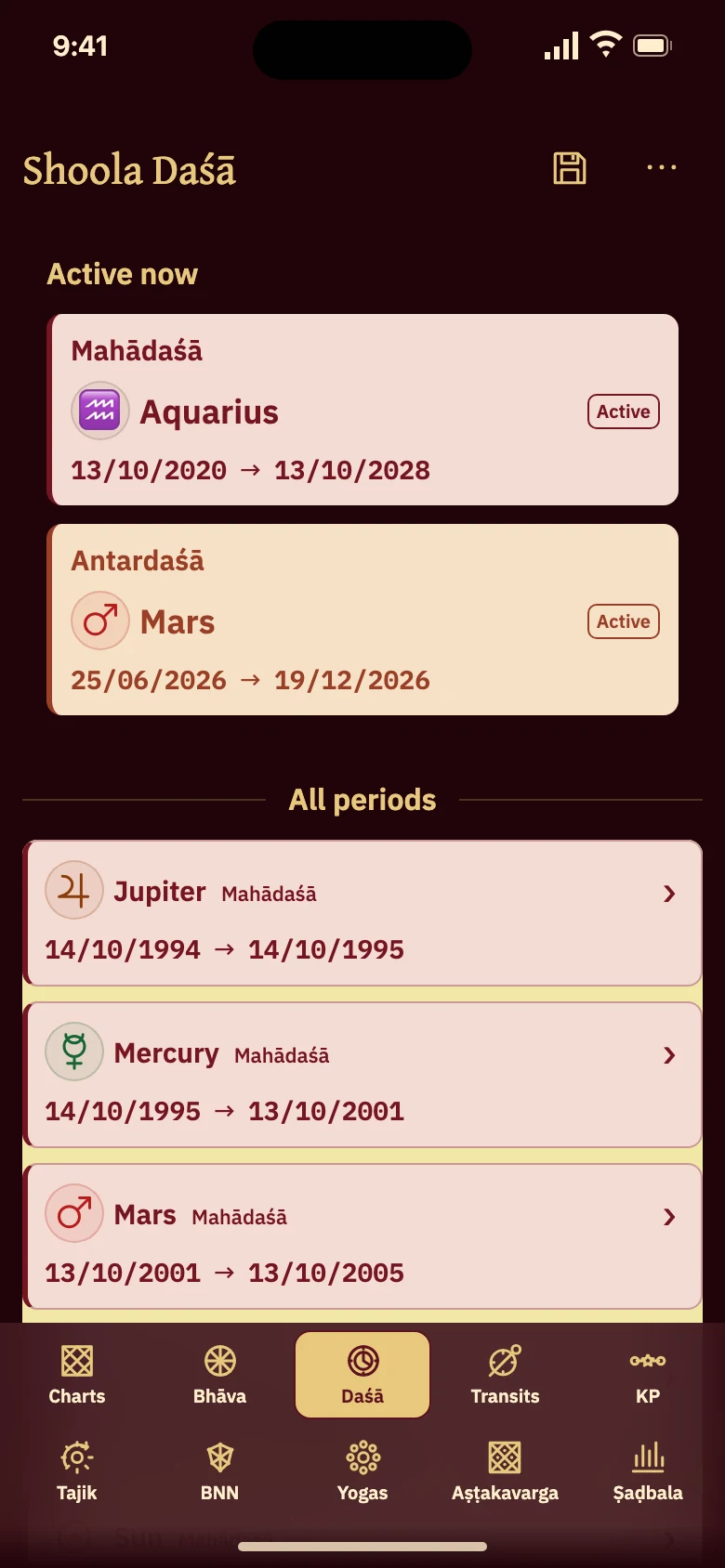
This real preview selects Shoola for Nila Raman’s chart. It preserves the app’s own period labels and dates; the illustration above uses the saved fixture’s sign names.
Open Śūla Daśā in Mạghā